How to redact documents for an insurance claim
By RedactSnap ·
An insurance claim gathers a lot of paper: the claim form, receipts, bank or card statements that prove what you paid, a police report and the insurer's letters. Your insurer needs everything that relates to the loss, so don't redact that. What you can hide is what has nothing to do with the claim, such as other transactions on a statement. And when you share the claim with a contractor, a friend or an online forum, they need far less than the insurer.
Leave the claim itself alone
An insurer checks the claim against the evidence, and a gap where it expects a figure slows the claim down or invites more questions. Hiding something that relates to the loss can look like concealment. Never change a figure, a date or a description: that turns a privacy step into a false document. Send these in full:
- Your name, address and policy number, and the claim number once you have one.
- The date, time and cause of the loss, and the list of damaged or stolen items.
- Photos and videos of the damage.
- Receipts and other proof of purchase for the items you claim, and the amounts on them.
- The police report for a theft or a break-in.
- Receipts for repairs, cleaning and any hotel stays the policy covers.
What you can usually hide
Supporting documents often show more than the claim needs. Ask your adjuster before you send a redacted copy, and say in your covering note what you have hidden and why. These are the usual candidates:
- On a bank or card statement used as proof of purchase: the other transactions, the balance, and the account or card number except the last four digits.
- On a receipt: loyalty and membership numbers, and other items bought at the same time.
- Account numbers, card numbers and signatures that don't relate to the loss.
- Details of other people that the claim doesn't need, such as a family member's phone number or email address.
Sharing a claim or denial letter with someone else
A public adjuster or a lawyer working on the claim needs the full file. Almost everyone else needs much less. A contractor quoting for the repair needs the address and the claim number, not your coverage limits or bank details. If you post an insurer's letter online to ask for advice, hide your name and address, the policy and claim numbers, the adjuster's name and direct line, and your signature. What readers need is the wording of the decision.
If you apply for disaster assistance, FEMA asks for a copy of your insurance settlement or denial letter. Send it in full, as you would to the insurer.
Redact a claim document step by step
Work on a copy and keep the original. RedactSnap runs in your browser, so the documents aren't uploaded anywhere.
Step 1: Open redactsnap.com/app and drop in the PDF, or a photo of the paper document. Click Find sensitive data and add the numbers you want hidden, such as the policy number or an account number, under "Also find a word". Click Scan document: Smart Scan also finds emails, phone numbers and card numbers, and reads typed answers in form fields.
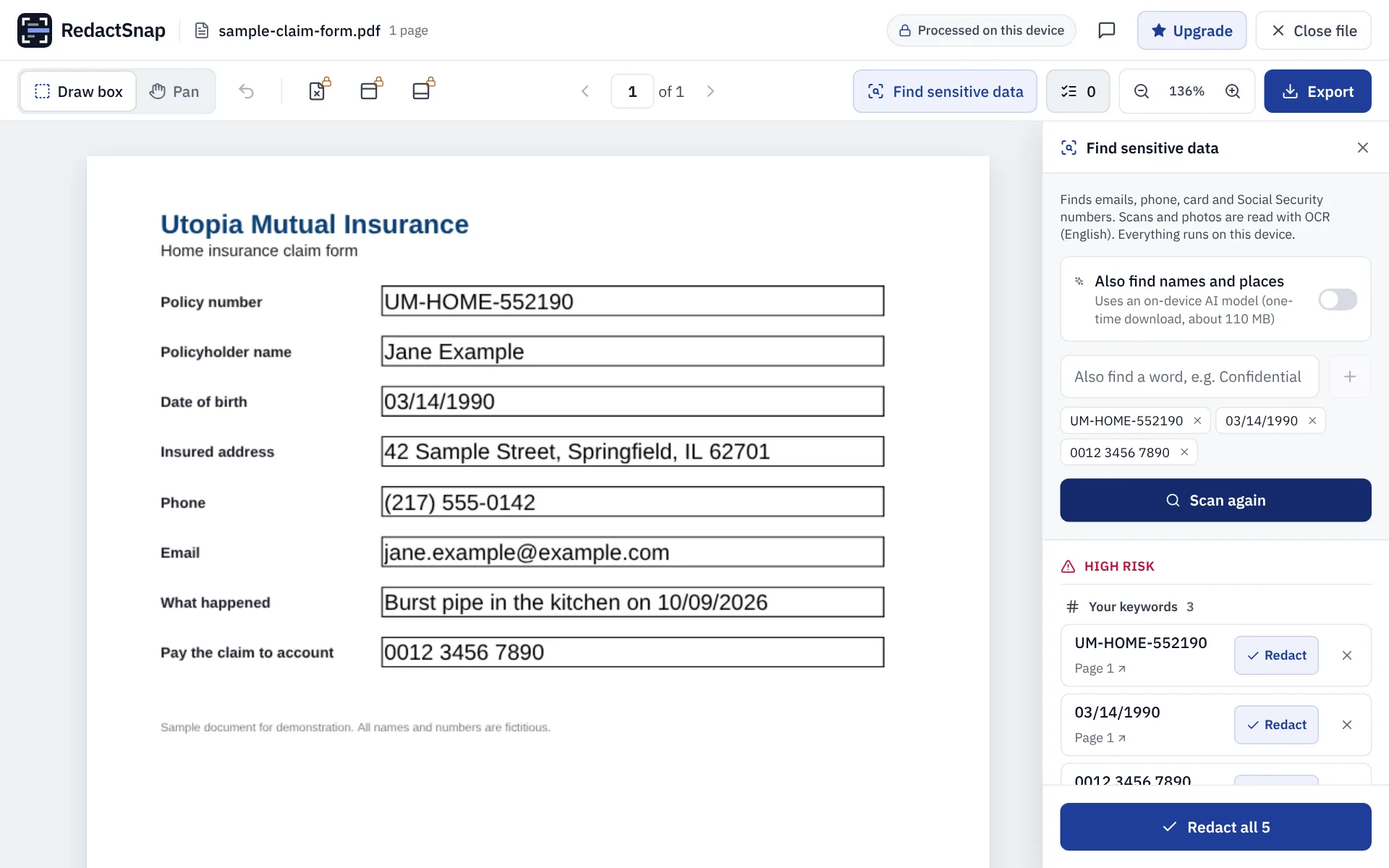
Step 2: Choose which findings to redact. For a copy going to your insurer, redact only what doesn't relate to the claim. Draw boxes over anything the scan missed, such as signatures and handwriting.
Step 3: Export and download. Every page is flattened to an image, so the hidden text isn't in the file, and the tool checks the exported file for the words you redacted.
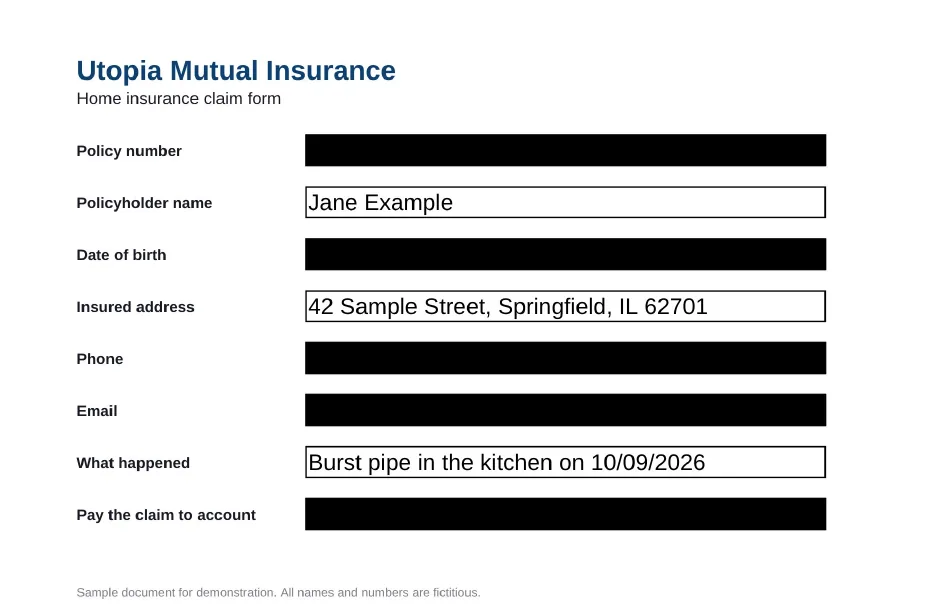
Step 4: Open the result and check it at full size before you send or post it.
Try it on your own file
The tool opens PDFs, PNGs and JPGs in your browser. The file is not uploaded.